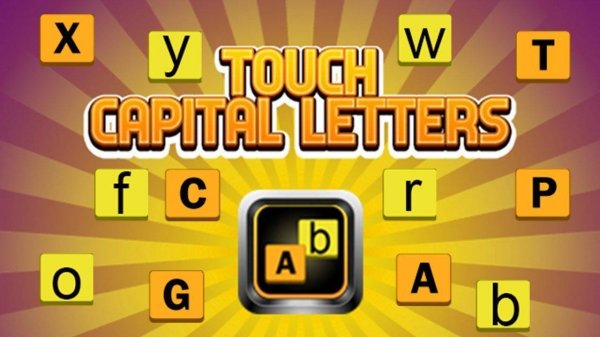
Capital Letter Recognition Game
TAP TO PLAY

Capital Letter Recognition Game

Developer: Galaxy Far Games
Published: 2025-09-22
Updated: 2026-07-04

Reviews

Touch Capital Letters is an excellent tool for early alphabet learning. The game's straightforward design and gentle challenge keep young children engaged without frustration. The lack of ads and inappropriate content makes it a trusted choice for parents. The points system encourages focus and quick thinking, while the simple tap controls are perfect for small fingers. It is a reliable, educational game that supports letter recognition in a fun and safe way.

Description

Game Introduction

Touch Capital Letters is an educational game designed for young children to practice recognizing capital letters. The screen shows a mix of capital and simple letters. The goal is to tap only the capital letters. Each correct tap earns points. Letters disappear after a short time, adding a gentle challenge. This game is suitable for preschoolers and early learners. It offers a screen-friendly activity that supports letter recognition and quick thinking. Parents can feel confident knowing the content is completely safe, family-friendly, and free from any inappropriate material. The game turns learning into a fun activity, making it a useful addition to any child's playtime routine.

How to Play

Playing Touch Capital Letters is simple. When the game starts, letters appear on the screen one by one or in groups. Players tap or click on the capital letters before they vanish. Avoid tapping on the simple or lowercase letters, as that may end the round or reduce the score. Each successful tap on a capital letter adds to the score. The letters disappear after a few seconds, so players need to be fast and focused. The game is designed for kids, so there are no complicated controls. As the game progresses, letters may appear faster or in greater numbers, increasing the challenge.

Game Features

Safe and educational alphabet learning for kids. Simple tap controls suitable for young children. Letters appear at a steady pace to keep kids engaged without frustration. A points system rewards correct taps and encourages focus. No ads, no inappropriate content, and no external links. Works on desktop and mobile browsers for easy access.

Tips for Success

Practice regularly to improve speed and accuracy in identifying capital letters. Focus on the shape of each letter—capitals are usually larger and have distinct forms. Tap quickly but carefully, as tapping a lowercase letter may cost points. Playing in short sessions can help maintain concentration. Encourage your child to say the letter name aloud when they tap it, reinforcing learning. Most importantly, have fun and celebrate each correct tap to build confidence.
Compatibility

• OS: Windows 10+, macOS 11+, iOS 14+, Android 10+
• Browsers: Chrome 100+, Safari 15+, Edge 100+, Firefox 100+
• Not compatible with Internet Explorer
Tested on real devices ✅ works as expected
Faq
What age group is this game best for?
This game is ideal for preschoolers and early learners, typically ages 3 to 6. The simple mechanics and gentle challenge make it accessible for young children who are just beginning to learn the alphabet.
Does the game require an internet connection to play?
Yes, Touch Capital Letters is an online game that runs in a web browser. A stable internet connection is needed to load and play the game. It works on both desktop and mobile devices.
Are there any in-app purchases or hidden costs?
No, the game is completely free to play. There are no in-app purchases, subscription fees, or hidden costs. All features are available without any payment, making it safe and accessible for all families.
Can the game be played on a tablet or smartphone?
Yes, the game is designed to work on mobile browsers as well as desktop computers. The simple tap controls are well-suited for touchscreens on tablets and smartphones, allowing children to play on the go.
Does the game track or save player progress?
The game does not require any personal information and does not track individual player progress. Scores are shown during the current session but are not saved after the browser is closed, ensuring privacy.
Is there any sound or music in the game?
The game may include simple sound effects for correct taps or letter appearances, but it does not have background music. This keeps the experience focused and minimizes distractions for young learners.
Advertisement